The Hidden Pin Conversion Drivers
From "Ooh Pretty" to "Take My Money": 3 Hidden Drivers of Pinterest Pin ROI
We all want the viral Pin. But as a business owner, you can’t pay your mortgage with "impressions." You need clicks, and ultimately, sales. It’s obviously a bit more complicated to optimize for conversions, but for this conversation, I’ll keep things focused on the topic of your Pinterest Pins.
In this series, we’ve covered the basics (image, keyword), but what is missing are the technical signals that give the Pinterest algorithm and users greater context to position your Pin to earn the click. Based on the Tailwind study, I will outline three overlooked levers you can pull today to increase clicks.
The Power of "Alt Text" (123% More Clicks)
This was the most shocking stat of the entire study for me. Pins that included Alt Text (text describing the image for accessibility) received 123% more outbound clicks than those without. This makes sense because it mirrors an SEO best practice of including alt tags for all your website images. And, what do we know about Pinterest? It shares many of the same qualities as a search engine and how it functions.
Additionally, Pins with alt text get 25% more impressions and 56% more profile visits…compared to Pins without it.
Why it works:
Accessibility: It allows visually impaired users to engage with your content.
SEO Context: It gives the algorithm another layer of data to understand exactly what is in your image.
The Fix: Try not to skip the Alt Text field. Describe your image simply: "Gold amethyst drop earrings on a white marble background." It takes 20 seconds, but the ROI is undeniable.
Truth-telling time, filling in the Alt Text field does require an extra step. The extra effort does add context to Pinterest and can give your audience more reasons to click, especially those using screen readers.
My recommendation is to go the extra mile on your top-performing Pins or best-selling products.
There are a few ways you can try this:
Go to create a Pin inside your Pinterest business account
Once you upload your Pin image, you will be prompted to add your Pin title, description, and destination link
Click on the button ‘Add alt text’ to write your alt text, then publish the Pin immediately or publish at a later date

Or, you can edit an existing Pin:
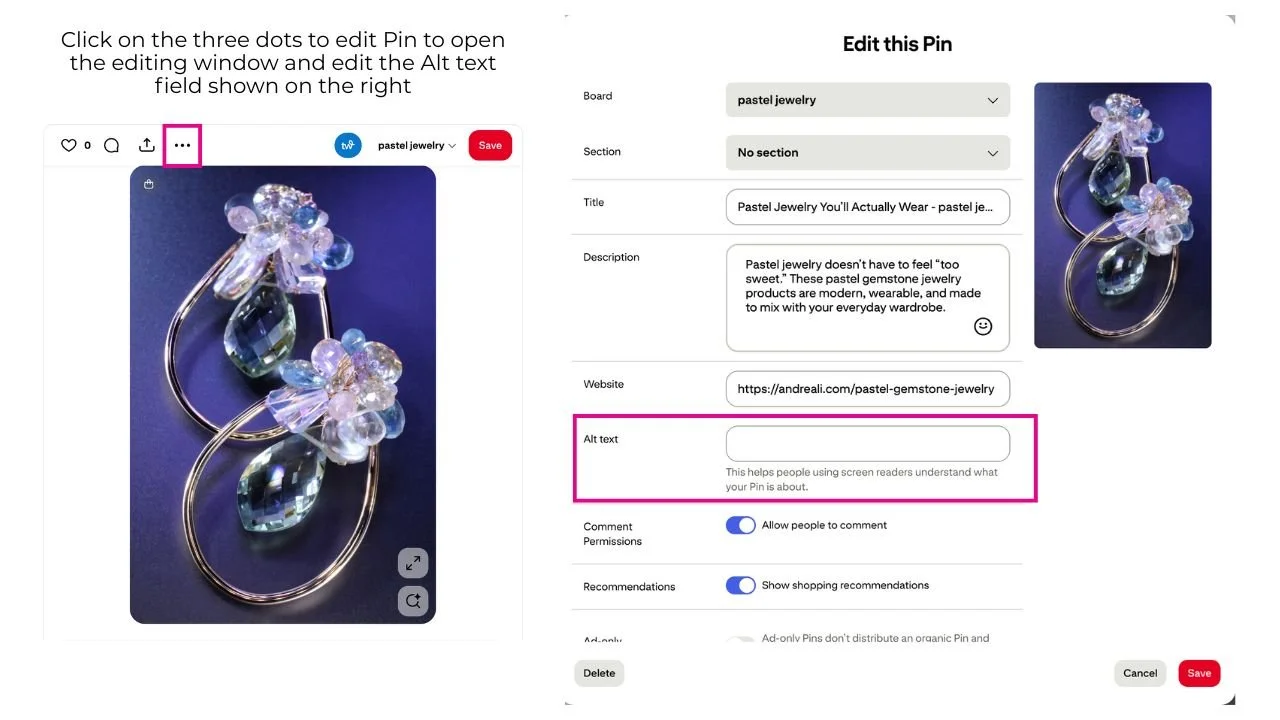
Go to your profile and open the Pin you want to edit.
Tap the ellipsis icon (three dots) in the top-right corner.
Select "Edit Pin".
Enter the alt text in the provided field.
Tap "Done" to save your changes.
If you’re scheduling Pins from Tailwind, you can use their free image alt text generator.
What makes for good alt text, you ask? It’s as simple as adding a sentence or two describing the image and what the Pin is about. Imagine you’re explaining it out loud to a friend. Keep it clear, keyword-aligned, and human.
It takes 20 seconds. But based on the numbers above, it could make all the difference.
Product Tagging: Don't Fear the Competition
I hear this objection all the time: "Andrea, if I turn on shopping, won't Pinterest auto-tag my competitors' products in my Pin?"
I’ll be honest, this issue has been a major pain point for creators in the home decor space, where Pinterest will auto-tag your Pin with other related products similar to those featured in the Pin. While I haven’t seen this be an issue specifically with jewelry, I will share what I have encountered. Turning on shopping features on Pinterest doesn't automatically tag your pins with unrelated products, but it does enable Pinterest's visual search to identify and suggest similar or complementary items from your catalog.

If you still are not fond of the Pinterest shopping features, here’s how to set how much Pinterest suggests other brands' products alongside yours:
Turn Off Shopping Recommendations: You can disable the "Show similar products" feature in your Pinterest settings to prevent these third-party suggestions from appearing with your own Pins. This setting only affects Pins you've created.
Manually tagging your own Pins: You can tag products from your own catalog to ensure users see your items first, minimizing the need for Pinterest to suggest others.
Even if you turn off Shopping Recommendations, keep in mind that the study showed that viral fashion Pins (jewelry is a subcategory under fashion) were 4x more likely to include shopping recommendations. This is a clear benefit of allowing Pinterest shopping suggestions.
Red Pin Geek Strategy: Regardless of whether the shopping recommendation is synced, tag your Pins with your own URLs. Create a smooth ‘click-to-buy’ shoppable Pin. Tagging your own content keeps the user in your ecosystem and is essential for e-commerce ROI. Afterall, your Pins should be a direct sales tool. Bonus: You can tag multiple products in one image. Say, you have a lifestyle image of a model wearing multiple pieces; you can tag every product featured in that image, creating an immersive shopping experience with your Pin.
Here’s how you do it:

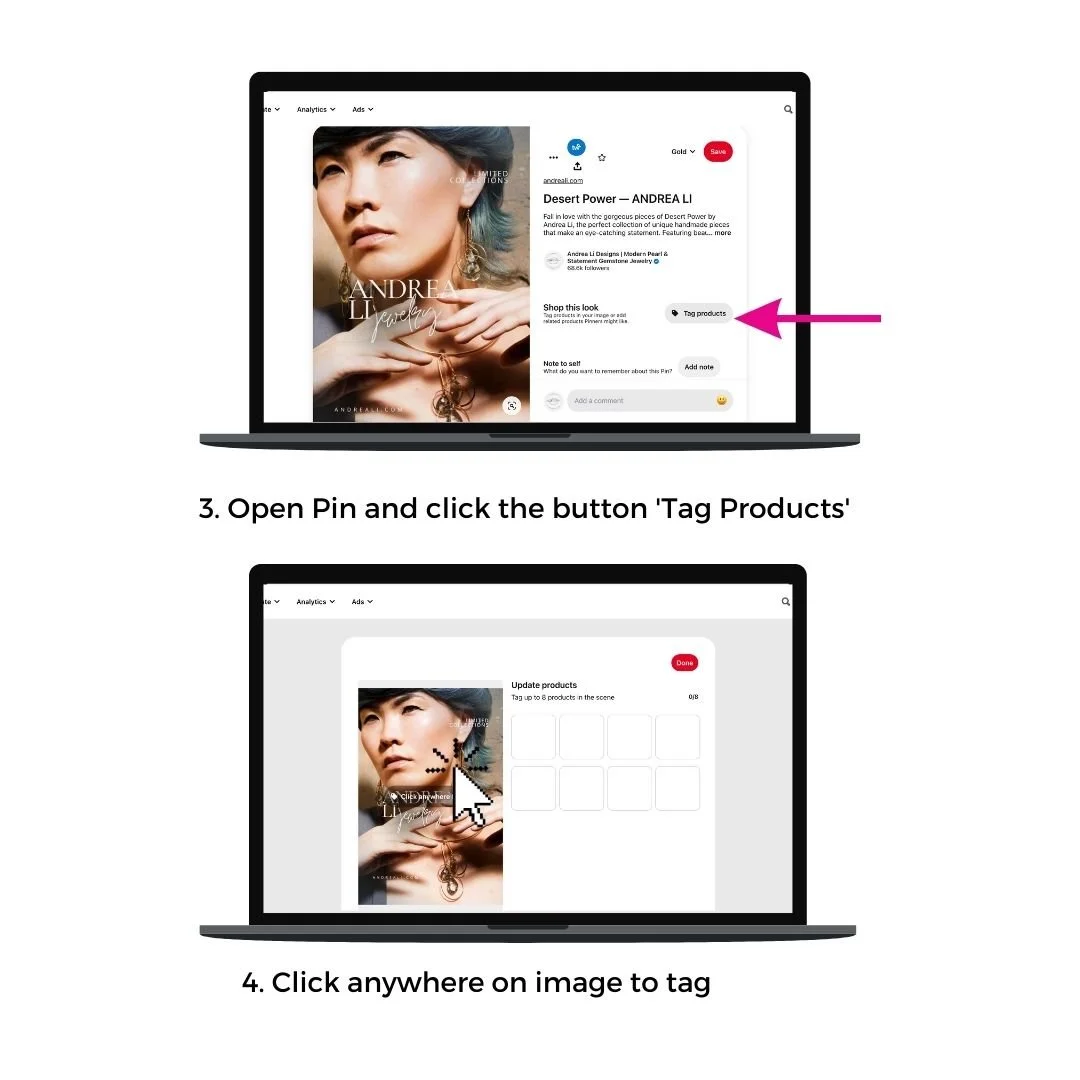
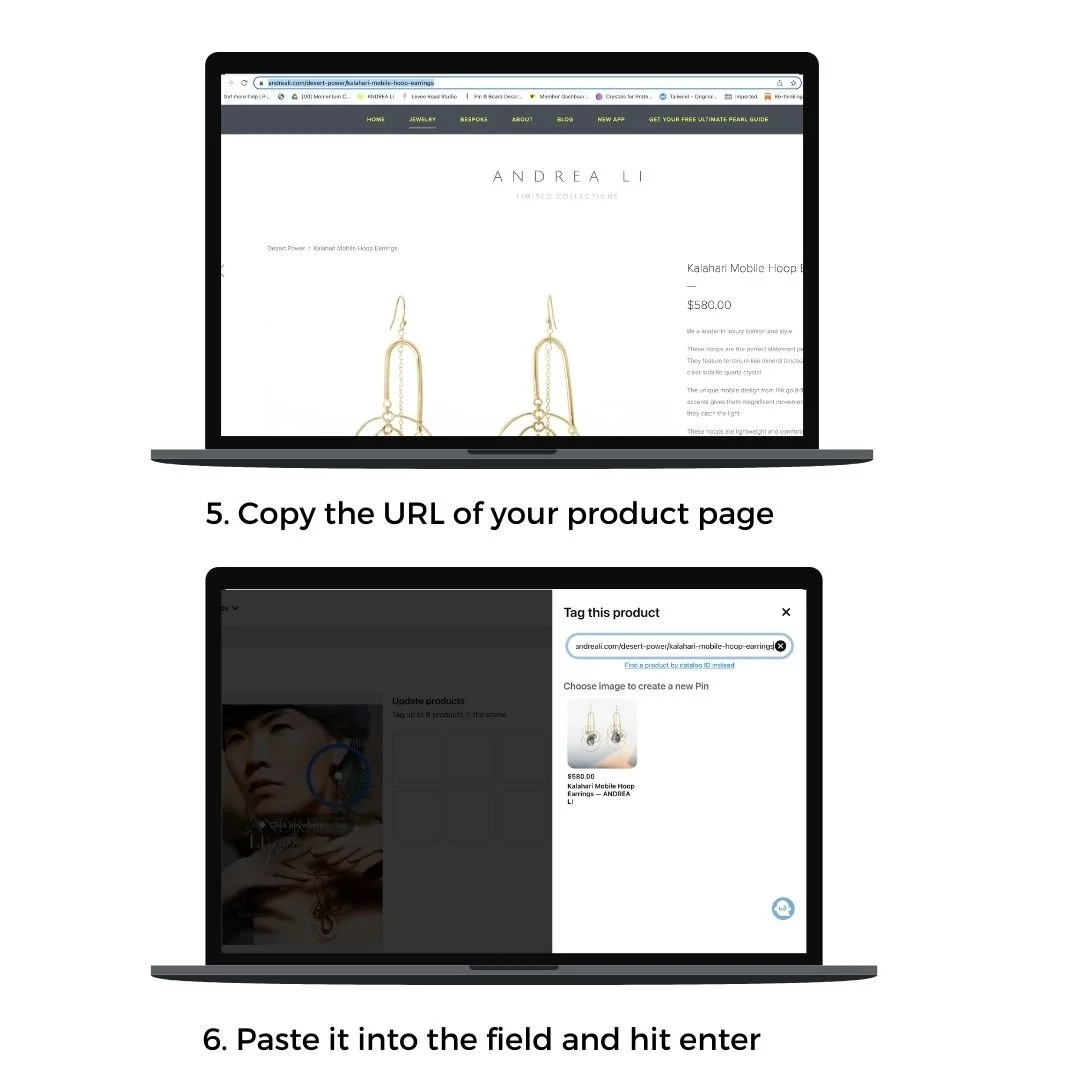

🎯Bonus tip: For your best-sellers, or best-performing Pins, make sure those Pins definitely have tags. Even if you just prioritize these Pins, that’s way more optimal than avoiding tagging altogether because tagging does require an extra step.
The "You're Already Late" Timeline (Seasonality)
One of the psychological underpinnings (pun intended) of a user on Pinterest is heavily influenced by seasonality. Think about it, people go to Pinterest to get ideas on ‘spring outfit ideas’, or ‘holiday gift ideas’. Here is a hard pill to swallow: If you are pinning for Christmas in November, you are too late. Let’s chat about what happens on Pinterest every single holiday season like clockwork:
The algorithm shifts, big time.
And it makes sense, right? Holiday content is one of the most searched, saved, and shopped topics on the entire platform. So Pinterest adjusts the way it surfaces content to meet that seasonal demand.
Here’s what that means for you:
Holiday Pins get a serious visibility boost. The algorithm prioritizes seasonal topics across:
The Home Feed
Related Pins
And most importantly… the Interests tab
We already know from Tailwind’s Viral Pin study that 60% of Pins that drove the most engagement were on Pins over a year old, and over 40% were on Pins over two years old.
In my Pinterest management mastermind, most PMs are seeing Pins take 6 months to rank.
In other words: if you’re creating content around holiday gifts, styling ideas, seasonal launches, or festive how-tos, two weeks, three weeks, even four weeks in advance is NOT the time to publish and Pin it.
We know that Pinterest users plan way ahead, and we also know that your Pins take time to gain traction on the platform. So, how early should you start pinning seasonal content?
The study confirmed that 40% of engagement comes from Pins over 2 years old. Pinterest is a slow-burning platform.
The Strategy: You need to be pinning seasonal content 4 to 6 months in advance.
The "Evergreen" Hack: If you have best-selling products that work for the holidays, start pinning them now, regardless of the season. Let them age like fine wine so they are ready to rank when the holiday rush hits.
The short answer is you can never be too early. Let’s break down what this could look like for you.
Your evergreen products. Which stocklists have taken up permanent residence in your business? Pieces you know will be available a year from now. Pull from these to create holiday-related Pins and schedule those now. In a year, they will have had enough time on the platform to start ranking in holiday searches.
💡 Pro tip: Even if your products aren’t explicitly “holiday,” there are creative ways to join the conversation. Think: gift guides, color palettes, seasonal vibes, or stories tied to meaningful celebrations.
Create a holiday content plan to include blogs covering topics users on Pinterest would search for, such as festive how-tos and ‘statement jewelry for holiday parties’. Publish and Pin 6 months before the holiday season.
For seasonal launches, publish Pins as soon as you have a live collection uploaded. This way, you have image assets and live URLs to include with your Pins. To reach a wider audience more quickly, run a promoted Pin campaign.
You’ve got something beautiful to offer, and Pinterest is giving you the stage. Let’s make sure your content shows up when people are searching for it.
Other seasonal trends to keep in mind:
Wedding content? Peaks in March.
Valentine's Day? Searches start in August.
Mother’s Day? You should’ve pinned it in December, the year before. 😅
Today’s action step:
Check out Pinterest Trends.
Plan next year’s content now, not later.
Timing = visibility. Let’s get ahead of the curve.
Unlock the Pinterest strategy system backed by serious data and tailored explicitly for jewelry designers and small creative businesses.
This resource is more than just a calendar. It’s a full-blown Pin Planning Blueprint to help you:
Stay 4–6 months ahead of trends
Save time by knowing what to Pin, when
Optimize Pins to perform like the viral ones we studied over the 4th quarter of last year.
Conclusion: Build the Ecosystem
Pinterest isn't just about throwing images up and hoping for the best. It's about building a web of signals, Alt text, tags, and timing, that proves to the algorithm your content is worth the click. Perhaps the most important gain from implementing these modern techniques is that you increase the likelihood that your Pin will reach your audience. But that is only the beginning.
For those who are serious about maximizing their clicks for conversions, aka sales, I take the conversation beyond the Pinterest platform. Why? Because, as a Pinterest manager, I noticed clients getting referral traffic but no sales, so I made it my mission to understand why. I went deep to study organic evergreen conversion strategies where they matter most: your website. Pinterest isn’t the problem; it just needs backup. Now I help you build what comes after the click. It seemed reasonable to go straight to the sticking point where customers leave to get answers for why conversions are challenging.
Now I help creatives build conversion-ready websites that actually drive their Pins to convert.
All the traffic in the world won’t matter if your website is not set up to convert. I’m talking about new leads for custom engagement ring inquiries, email signups, and the Holy Grail of sales. That’s why I now also help creatives build conversion-ready websites that actually drive their Pins to convert. Because what I discovered changed everything, it scales your brand's visibility beyond the Pinterest platform to the broader web. Implementing these findings has worked for my two websites and for my client's websites.
Here’s what I’ve learned (and how it helps you grow and future-proof your brand's discoverability):
Customer Journey Mapping:
Your content should match how people shop and the questions they ask, especially for high-consideration purchases like jewelry. So I now map the journey from “I have an idea to buy this” to “I must have this” using search positioning, content funnels, custom welcome sequences, and Pinterest together.
SEO That Feels Human:
I studied the strategy and the tech, from keywords to crawling. I now build pillar and landing pages that are optimized for both Google and your audience. I reworked the website architecture with strategic internal link mapping to create a seamless user journey to guide visitors to take the next logical step effortlessly.
LLM Optimization:
Turns out, AI tools like ChatGPT and Google’s search bots read your site like a book. I now structure content to be easily understood by both machines and humans, so it actually gets recommended, cited, and discovered.
Custom Funnels + Interactive Tools:
Quizzes. Engagement Ring calculators. Virtual ring try-ons. Scrap metal and Affirm payment estimators. These interactive experiences reduce overwhelm, increase clarity, drive appointment bookings, and provide a seamless customer journey to guide customers from curiosity to conversion.
AI as Your Marketing Assistant:
I’ve built CustomGPTs for jewelry brands, spiritual teachers, and product-based businesses that organize content, work smarter, build workflows, write content, and save time, all while supporting your business goals without compromising your brand voice.
So what does that mean for you?
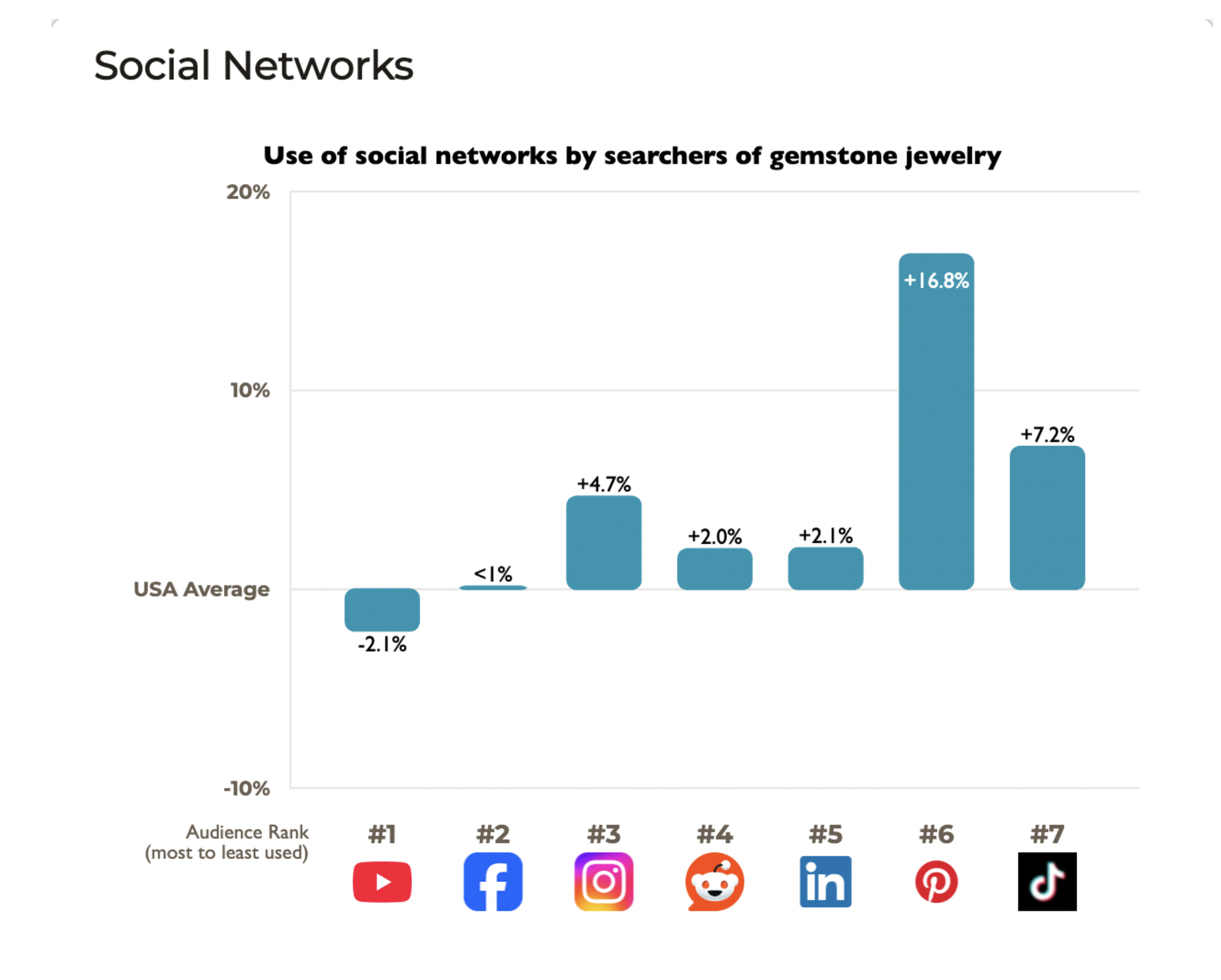
Don’t worry, Pinterest stands out as the top social platform for people searching for keywords related to the jewelry niche, like gemstone jewelry. Pinterest is being used much more by this audience than by Americans in general, 16.8% more, according to the data.
This means shoppers interested in gemstone jewelry are much more likely to use Pinterest than the average social media user, making it a highly valuable marketing channel for creative jewelry businesses. By the way, I ran multiple keyword comparisons in the jewelry category, and Pinterest came out on top for all of them, surpassing Instagram and TikTok.
It means I’m still your go-to for Pinterest strategy, but now, I can help you build the entire content ecosystem behind it.
Whether that’s:
Reworking your site structure so it’s search-friendly
Creating a Pinterest-powered funnel that leads to sales
Designing an evergreen blog series that actually gets traffic
Mapping a full journey from “ooh pretty pin” to “take my money”
… I can help you transform your content into a system that drives website traffic growth and positions you for increased conversions.